Insert Page Numbers v2

Written by

in

Insert Page Numbers v2

Artboards made their appearance in CS4, and ever since, users have asked the logical question “can I add page numbers to my Artboards?”. The Answers has been a quick “No”….until now, by way of a script.
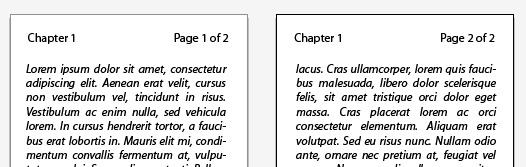
// Illustrator Insert Page Numbers v2 Script

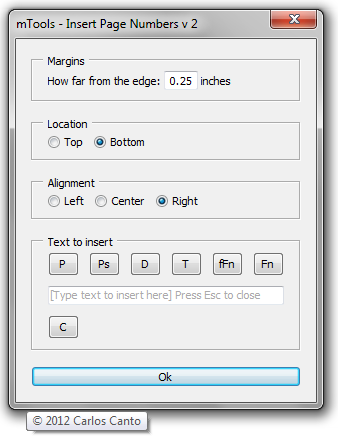
it’s primary use is to insert page numbers but it can insert anything you type in the input box.
there are a few keywords to use to insert date, time, full name, and file name.

to insert

  • page number – type – *page*
  • total pages – type –  *pages*
  • date – type –  *date*
  • time – type –  *time*
  • full name – type –  *fname*
  • file name – type –  *file*

for example to insert “page 1 of 12” type “page *page* of *pages*” (without quotes).

Note, in this version, pressing “Ok” does not dismiss the dialog. The idea is to be able to enter for example:
Pages on bottom right, and file name on bottom left without having to fire the script twice.

One more thing, press ESC to close the dialog.
Download: insertPageNumbersV2.zip

Comments

20 responses to “Insert Page Numbers v2”

  1. Leyla Avatar
    Leyla

    Is There anyway to have the numbering skip the first and last pages of a document?

  2. […] avere la necessità di numerare le tavole e anche per questa funzione esiste uno script chiamato Insert Page Number che per l’appunto aggiunge in maniera automatica la numerazione di pagina e volendo anche la […]

  3. mominul islam Avatar
    mominul islam

    i want facing page no.
    left right alignment
    like indesign
    microsoft word

  4. Qazi Avatar
    Qazi

    This is very raw but it works Now you can enter Starting page Number if it is not 1
    please copy paste this script in any text editor and save as filename.jsx and use this in illustrator

    //—to start from page number greater than 1
    #target illustrator

    // script.name = UI_insertPageNumbers.jsx; // works with CS4 & CS5
    // script description = Inserts page numbers (or any other text) to all artboards in the active document;
    // script.required = at least one open document
    // script.parent = CarlosCanto // 11/14/11;
    // script.elegant = false;

    // Notes: The script creates a new layer (Page Numbers) then adds a text frame per Artboard that act as footer or header text.
    // Its primary function is to insert Page Numbers, but it could be used to insert any other kind of information.

    if (app.documents.length > 0) // continue if there’s at leat one document open
    {
    // start building User Interface
    var win = new Window(“dialog”,”MTools – Insert Page Numbers”);
    var panelMargins = win.add(“panel”, undefined, “Margins”);
    var lblMargins = panelMargins.add(“statictext”,undefined,”How far from the edge:”);
    var txtMargins = panelMargins.add(“edittext”,undefined, 0.25);
    var lblUnits = panelMargins.add(“statictext”,undefined,”inches”);

    var lblMargins = panelMargins.add(“statictext”,undefined,” Start Page# leave blank if 1:”);
    var startPageFrom = panelMargins.add(“edittext”,undefined, 0);

    var panelLocation = win.add(“panel”, undefined, “Location”);
    var radTop = panelLocation.add(“radiobutton”,undefined,”Top”);
    var radBottom = panelLocation.add(“radiobutton”,undefined, “Bottom”);

    var panelAlignment = win.add(“panel”, undefined, “Alignment”);
    var radLeft = panelAlignment.add(“radiobutton”,undefined,”Left”);
    var radCenter = panelAlignment.add(“radiobutton”,undefined, “Center”);
    var radRight = panelAlignment.add(“radiobutton”,undefined, “Right”);

    var panelFooter = win.add(“panel”, undefined, “Text to insert”);
    var grpPages = panelFooter.add(“group”);
    var btnPage = grpPages.add(“button”,undefined,”Insert Page”);
    var btnPages = grpPages.add(“button”,undefined,”Insert Pages”);
    var txtFooter = panelFooter.add(“edittext”,undefined, “[Type text to insert here]”);

    var btnOk = win.add(“button”, undefined, “Ok”);

    radRight.value = radBottom.value = true;

    win.alignChildren = panelFooter.alignChildren = “fill”;
    panelMargins.spacing = 3;
    panelMargins.orientation = panelLocation.orientation = panelAlignment.orientation = “row”;

    win.helpTip = “Coded by CarlosCanto”;
    btnPage.helpTip = “Adds *page* keyword, it represents a single page”;
    btnPages.helpTip = “Adds *pages* keyword, it represents total number of pages”;
    txtFooter.helpTip = “Type \r\t’Page *page* of *pages*’ \rto get \r\t’Page 1 of 3′ \rfor example”;

    //—————————————————————————————–
    btnOk.onClick = function(){
    doSomething(); // call main function
    win.close(); // close when done
    }
    //—————————————————————————————–
    //—————————————————————————————–
    btnPage.onClick = function(){
    footer(“*page*”);
    }
    //—————————————————————————————–
    //—————————————————————————————–
    btnPages.onClick = function(){
    footer(“*pages*”);
    }
    //—————————————————————————————–

    win.center();
    win.show();

    //—————————————————————————————–

    function footer (page) //
    {
    txtFooter.text = txtFooter.text + page;
    }

    function doSomething()
    {

    //alert(“I’m doing something”);
    //——————————————— enter no where to start from
    // var startPageFrom=100;
    var idoc = app.activeDocument;
    var ilayer = idoc.layers.add();
    ilayer.name = “Page Numbers”;
    var startPageFromNo =Number(startPageFrom.text);

    var pages = idoc.artboards.length; // number of artboards
    var footerPages = (txtFooter.text).replace(“*pages*”,pages); // replace the “*pages*” keyword with the actual number fo pages (artboards)

    var margins = Number(txtMargins.text)*72; // get margins in points
    //$.writeln(margins);

    if (startPageFromNo > 1) {
    startPageFromNo = startPageFromNo-1;
    }

    for (i = 0; i<idoc.artboards.length; i++) // loop thru all artboards, and add input text from UI
    {

    footerPage = footerPages.replace("*page*",i+1+startPageFromNo); // replace "*page*" keyword with the actual page Number
    var itext = ilayer.textFrames.add();
    itext.contents = footerPage; //"page 1 of 1";
    var fontSize = itext.textRange.characterAttributes.size;

    var activeAB = idoc.artboards[i];

    var iartBounds = activeAB.artboardRect;

    var ableft = iartBounds[0]+margins;
    var abtop = iartBounds[1]-margins;
    var abright = iartBounds[2]-margins;
    var abbottom = iartBounds[3]+margins+fontSize;

    var abcenter = ableft+(abright-ableft)/2;

    if (radRight.value == true)
    {
    //var msg = "right";
    itext.left = abright;
    itext.textRange.paragraphAttributes.justification = Justification.RIGHT;
    }
    else if (radCenter.value == true)
    {
    //var msg = "center";
    itext.left = abcenter;
    itext.textRange.paragraphAttributes.justification = Justification.CENTER;
    }
    else
    {
    //var msg = "Left";
    itext.left = ableft;
    itext.textRange.paragraphAttributes.justification = Justification.LEFT;
    }

    if (radTop.value == true)
    {
    var msg = "top";
    itext.top = abtop;
    }
    else
    {
    var msg = "bottom";
    itext.top = abbottom;
    }
    } // end for loop thru all artboards
    } // end function doSomething();
    }
    else
    {
    alert ("there's no open documents");
    }

  5. Qazi Avatar
    Qazi

    i just added a variable in script to for starting page no
    but i do not know how to add that in dialog box
    please CARLOS add variable and start i loop from that variable
    right now i change every time when i need to mention starting page number.

  6. Qazi Avatar
    Qazi

    hi sig i just added it search
    open script by double click and find line
    var startPageFrom=100;
    i mentioned 100 you can change this no to start from

    #target illustrator

    // script.name = UI_insertPageNumbers.jsx; // works with CS4 & CS5
    // script description = Inserts page numbers (or any other text) to all artboards in the active document;
    // script.required = at least one open document
    // script.parent = CarlosCanto // 11/14/11;
    // script.elegant = false;

    // Notes: The script creates a new layer (Page Numbers) then adds a text frame per Artboard that act as footer or header text.
    // Its primary function is to insert Page Numbers, but it could be used to insert any other kind of information.

    if (app.documents.length > 0) // continue if there’s at leat one document open
    {
    // start building User Interface
    var win = new Window(“dialog”,”MTools – Insert Page Numbers”);
    var panelMargins = win.add(“panel”, undefined, “Margins”);
    var lblMargins = panelMargins.add(“statictext”,undefined,”How far from the edge:”);
    var txtMargins = panelMargins.add(“edittext”,undefined, 0.25);
    var lblUnits = panelMargins.add(“statictext”,undefined,”inches”);

    var panelLocation = win.add(“panel”, undefined, “Location”);
    var radTop = panelLocation.add(“radiobutton”,undefined,”Top”);
    var radBottom = panelLocation.add(“radiobutton”,undefined, “Bottom”);

    var panelAlignment = win.add(“panel”, undefined, “Alignment”);
    var radLeft = panelAlignment.add(“radiobutton”,undefined,”Left”);
    var radCenter = panelAlignment.add(“radiobutton”,undefined, “Center”);
    var radRight = panelAlignment.add(“radiobutton”,undefined, “Right”);

    var panelFooter = win.add(“panel”, undefined, “Text to insert”);
    var grpPages = panelFooter.add(“group”);
    var btnPage = grpPages.add(“button”,undefined,”Insert Page”);
    var btnPages = grpPages.add(“button”,undefined,”Insert Pages”);
    var txtFooter = panelFooter.add(“edittext”,undefined, “[Type text to insert here]”);

    var btnOk = win.add(“button”, undefined, “Ok”);

    radRight.value = radBottom.value = true;

    win.alignChildren = panelFooter.alignChildren = “fill”;
    panelMargins.spacing = 3;
    panelMargins.orientation = panelLocation.orientation = panelAlignment.orientation = “row”;

    win.helpTip = “Coded by CarlosCanto”;
    btnPage.helpTip = “Adds *page* keyword, it represents a single page”;
    btnPages.helpTip = “Adds *pages* keyword, it represents total number of pages”;
    txtFooter.helpTip = “Type \r\t’Page *page* of *pages*’ \rto get \r\t’Page 1 of 3′ \rfor example”;

    //—————————————————————————————–
    btnOk.onClick = function(){
    doSomething(); // call main function
    win.close(); // close when done
    }
    //—————————————————————————————–
    //—————————————————————————————–
    btnPage.onClick = function(){
    footer(“*page*”);
    }
    //—————————————————————————————–
    //—————————————————————————————–
    btnPages.onClick = function(){
    footer(“*pages*”);
    }
    //—————————————————————————————–

    win.center();
    win.show();

    //—————————————————————————————–

    function footer (page) //
    {
    txtFooter.text = txtFooter.text + page;
    }

    function doSomething()
    {

    //alert(“I’m doing something”);
    //——————————————— enter no where to start from
    var startPageFrom=100;
    var idoc = app.activeDocument;
    var ilayer = idoc.layers.add();
    ilayer.name = “Page Numbers”;

    var pages = idoc.artboards.length; // number of artboards
    var footerPages = (txtFooter.text).replace(“*pages*”,pages); // replace the “*pages*” keyword with the actual number fo pages (artboards)

    var margins = Number(txtMargins.text)*72; // get margins in points
    //$.writeln(margins);

    for (i = 0; i<idoc.artboards.length; i++) // loop thru all artboards, and add input text from UI
    {

    footerPage = footerPages.replace("*page*",i+1+startPageFrom); // replace "*page*" keyword with the actual page Number
    var itext = ilayer.textFrames.add();
    itext.contents = footerPage; //"page 1 of 1";
    var fontSize = itext.textRange.characterAttributes.size;

    var activeAB = idoc.artboards[i];

    var iartBounds = activeAB.artboardRect;

    var ableft = iartBounds[0]+margins;
    var abtop = iartBounds[1]-margins;
    var abright = iartBounds[2]-margins;
    var abbottom = iartBounds[3]+margins+fontSize;

    var abcenter = ableft+(abright-ableft)/2;

    if (radRight.value == true)
    {
    //var msg = "right";
    itext.left = abright;
    itext.textRange.paragraphAttributes.justification = Justification.RIGHT;
    }
    else if (radCenter.value == true)
    {
    //var msg = "center";
    itext.left = abcenter;
    itext.textRange.paragraphAttributes.justification = Justification.CENTER;
    }
    else
    {
    //var msg = "Left";
    itext.left = ableft;
    itext.textRange.paragraphAttributes.justification = Justification.LEFT;
    }

    if (radTop.value == true)
    {
    var msg = "top";
    itext.top = abtop;
    }
    else
    {
    var msg = "bottom";
    itext.top = abbottom;
    }
    } // end for loop thru all artboards
    } // end function doSomething();
    }
    else
    {
    alert ("there's no open documents");
    }

  7. Driss Avatar
    Driss

    Thanks man if I had money I would donate to this

  8. Tani Avatar
    Tani

    Hi Carlos …Thanks for the script… It is useful for starting the numbering.
    But, if there are many Illustrator files, say 4 files of 15 artboards each and one wants to continue the numbering…
    1st Ai files – has 1 to 15, the 2nd Ai file has to have the numbering starting from 16 to 30
    BUT this script restarts from 1 again and not as a continuity.
    So can you please have another option in the dialog box to “SPECIFY the STARTING INDEX”
    I guess a lot of people have the same thought!
    Please do a future release! Thanks

    1. Carlos Avatar
      Carlos

      Hi Tani, I hear you, I’ll add starting page feature as soon as I have some time.

      Thanks for posting
      Carlos

  9. Umesh Verma Avatar
    Umesh Verma

    Nice tool, Thanks…

  10. Jae Avatar
    Jae

    Fantastic!

  11. Kun Avatar
    Kun

    thank you man!

  12. Courtney Avatar
    Courtney

    Hi
    Awesome script! Is there a way to have the script place numbers in the left corner of odd numbered pages and the right corner in even numbered pages so that when we run it we can submit it for print with numbers in the correct corners?

    Thanks

    1. Carlos Avatar
      Carlos

      Hmm…I think it’s possible, let me see, I’ll add log it for a future release

  13. Suraj Shrestha Avatar
    Suraj Shrestha

    Thanks! was great help with your Script!

  14. yunus Avatar
    yunus

    To start the required number???

  15. SIG Avatar
    SIG

    hey, i have a problem and i really need your help… your script’s really usefull, but i have over 100 artboard (example: i have 150 artboard) and AI just give you 100 artboard for each file, so i have save on 2 file ai. In first file ai, your script is ok, but in second file, i cannot make number page from 100th page.
    Can you upgrade your script??? i do with more artboard, so i need your script so much…
    Ah, can you plus whitle line for your number? (incase i must print with black background.)

Leave a Reply

Your email address will not be published. Required fields are marked *

Cookie Preferences

We use cookies to enhance your experience. Choose which types of cookies you want to allow.

Strictly Necessary

Required

Required for core site functions such as security, load balancing, login sessions and remembering your cookie choices. No data is shared with third parties. Cannot be disabled.

Functional

Remember choices you make (language, region, preferences) to provide enhanced, personalized features. May set cookies from embedded services you interact with, such as video players or maps.

Analytics

Measure how visitors use the site (pages viewed, time on page, referring source) so we can improve it. Data may be processed by analytics providers such as Google Analytics, generally in aggregated form.

Marketing

Build a profile of your interests to show relevant advertising on this and other sites, and measure ad performance. Data may be shared with advertising partners such as Google Ads and Meta (Facebook).