Create a – Text Block – out of selected Point Text Items

textBlock

Written by

in

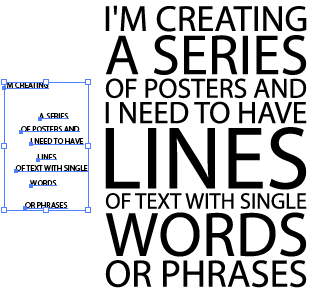
This script creates a “Block” of text out of Selected Point Text Items, that is, it re-sizes each frame so they all have the same width. Back then when I wrote the script I didn’t know this layout style was called “SlabType”, otherwise I would have picked a more suitable name, anyway, here’s my “textBlock” script. Please note that the final Block of Text is converted to Outlines.

textBlock


Download textBlock.jsx

Comments

30 responses to “Create a – Text Block – out of selected Point Text Items”

  1. Nube Avatar
    Nube

    it changes the order of my texts

  2. luis Avatar
    luis

    GRACIAS! this is a great script! thank you!

  3. Keith Bowman Avatar
    Keith Bowman

    Looks like this would be super helpful, except when I click the link to download the script, nothing happens.

  4. Jan Avatar
    Jan

    Unfortunately does not work with Adobe CC 2023 Illustrator … only showing errors and eventually never being able to run the script without deep-diving into the topic. Not helpful yet.

    1. Carlos Avatar
      Carlos

      What’s the error message Jan?

  5. Teras Avatar
    Teras

    It didn’t work for me. what did I do wrong?

  6. Russell Avatar
    Russell

    Love this script it’s very helpful!

    Is there any way to set the parameters for the sizes so if the width went over a certain height it would scale it down?

    1. Carlos Avatar
      Carlos

      Hi Russel, can you elaborate? Can you show me a sample of what you need?

  7. […] Скачать бесплатно Telegram 0 комментарий 0 FacebookTwitterTelegramEmail Предыдущая статья […]

  8. Rajendra Sachania Avatar
    Rajendra Sachania

    Crap script!

    1. Carlos Avatar
      Carlos

      Why? It wasn’t what you were expecting?

  9. […] L’ultimo script che affrontiamo oggi è chiamato Text Block. […]

  10. lexusbenthanhs.blogspot.com Avatar

    An impressive share! I’ve just forwarded this onto a co-worker who had been doing a little homework on this.
    And he actually ordered me lunch simply because I discovered it for
    him… lol. So allow me to reword this…. Thank YOU for
    the meal!! But yeah, thanx for spending time
    to discuss this matter here on your blog.

    1. Carlos Avatar
      Carlos

      What the hell!!! He should have ordered Me lunch, not you!! Lol

  11. Lee Avatar
    Lee

    Thank you for this great script, so useful! 🙂
    I’m running latest version of Illustrator on Windows 10, and most of the time it works as on your images on this place – with all the text in order.
    Sometimes however, it puts the sentences in the wrong order and I can’t see how it’s happening – is there something I need to do to make sure they’re always in the same order?

    1. Carlos Avatar
      Carlos

      Hi Lee, the script goes by the stacking order in the layers panel. Just arrange the text frames in the order you need them before running the script.

      1. Lee Dargue Avatar
        Lee Dargue

        Ah, of course! Amazing, thanks so much, Carlos 🙂

  12. Reto Schneebeli Avatar
    Reto Schneebeli

    Hy i like th script. Good work!!! Is there any chance to use this script into indesign?

    1. Carlos Avatar
      Carlos

      No, Illustrator scripts won’t work in InDesign. Have you tried copying and pasting? Or placing your Illustrator file after processing into InDesign?

  13. Cameron Avatar

    This is awesome…. but is there a way to do it without creating a new layer every time. I would like it to simply be placed on the same layer as the source text.

    I tried commenting out the code to add a layer and create a group.
    i.e.
    var dupLayer = idoc.layers.add(); // add a layer to place the new block of text
    dupLayer.name = “Text Block”;
    var blockGrp = dupLayer.groupItems.add(); // add a group to final output
    blockGrp.name = “Text Block”;

    Error 2: dupLayer is undefined.
    Line: 31
    -> var blockGrp = dupLayer.groupItems.add(); // add a group to final output

    and

    Error 2: blockGrp is undefined.
    Line: 38
    -> var itext = tf.duplicate(blockGrp, ElementPlacement.PLACEATEND); // duplicate text

  14. Fergus Avatar
    Fergus

    Superb! Exactly what I needed, when I needed it. Thank you.

  15. Evy Avatar

    Thanks so much! Your sripts really are good.

  16. Don Deo Avatar
    Don Deo

    can you create a script that can change the text?

    1. Carlos Avatar
      Carlos

      Probably, change to what?

      1. Ulysse Avatar
        Ulysse

        I think he meant “editable”. Excellent script!

  17. Welborne Avatar

    Amazing… saved me a lot of time 😀

  18. Mahmoud Elgendy Avatar
    Mahmoud Elgendy

    It’s very nice

  19. Pilartxo Avatar
    Pilartxo

    Simply perfect and useful!
    Thanks!

Leave a Reply

Your email address will not be published. Required fields are marked *

Cookie Preferences

We use cookies to enhance your experience. Choose which types of cookies you want to allow.

Strictly Necessary

Required

Required for core site functions such as security, load balancing, login sessions and remembering your cookie choices. No data is shared with third parties. Cannot be disabled.

Functional

Remember choices you make (language, region, preferences) to provide enhanced, personalized features. May set cookies from embedded services you interact with, such as video players or maps.

Analytics

Measure how visitors use the site (pages viewed, time on page, referring source) so we can improve it. Data may be processed by analytics providers such as Google Analytics, generally in aggregated form.

Marketing

Build a profile of your interests to show relevant advertising on this and other sites, and measure ad performance. Data may be shared with advertising partners such as Google Ads and Meta (Facebook).